
Create tasks in HubSpot to track follow-ups, calls, emails, meetings, and other activities that require action. Tasks can be associated with contacts, companies, deals, tickets, and other CRM records to help keep activity organized and visible across your team.
What are the ways to create tasks in HubSpot?
There are three common ways to create tasks in HubSpot:
Create a Task from a Contact Record (Recommended)
- Open the Contact record.
- In the activity timeline, click Create Task.
- Complete the task details:
- Task Name — enter a clear, descriptive name for the activity.
- Task Type — select the type that best represents the work (for example, Call, Email, or To-Do).
- Due Date — set a realistic date for completing the task.
- Task Owner — assign the task to the appropriate HubSpot user.
- Task Notes (optional) — add context such as conversation summaries, next steps, or relevant background information to help the task owner complete the activity.
- Click Create.
The task is automatically associated with the contact record and will appear in the assigned user's task list.
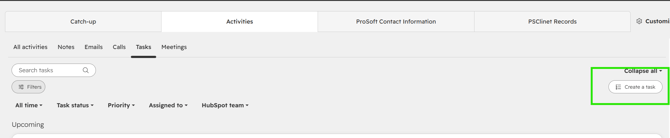
Recommended: Create tasks directly from the Contact record whenever possible. This automatically associates the task with the correct CRM record and provides better visibility into customer interactions.
Create a Task from the Sales Workspace
The Sales Workspace provides a central location for task management and is useful when creating tasks outside of a specific CRM record.
- In your HubSpot account, navigate to Sales > Sales Workspace.
- Click the Tasks tab in the navigation menu.
- Click Create Task.
- Complete the task information.
- Associate the task with the appropriate CRM record.
- Click Create.
Create a Task from the Tasks Page
- Navigate to CRM > Tasks.

- Click Create Task.
- Enter the required information.
- Associate the task with the appropriate CRM record.
- Click Create.
What task types are available in HubSpot?
When creating a task, select the task type that best represents the work being completed.
Common task types include:
- Call
- To-Do
- Meeting
- Follow-Up
Using the correct task type helps improve reporting and activity tracking.
What are the best practices for creating tasks in HubSpot?
To maintain an organized and effective task management process:
Do
|
Don't
|
Frequently Asked Questions
Can tasks be assigned to another user?
Yes. During task creation, select the appropriate Task Owner to assign the task to another HubSpot user.
Can tasks be associated with multiple records?
Yes. Tasks can be associated with multiple CRM records when needed.
Can tasks be created automatically?
Yes. HubSpot workflows can automatically create tasks based on predefined criteria and business processes.
Where should I create tasks?
Creating tasks from the Contact record is recommended because the task is automatically associated with the correct CRM record. The Sales Workspace and Tasks page can also be used when creating tasks outside of a specific record.
What happens after a task is created?
The task is added to the assigned user's task list and remains associated with the related CRM record for visibility, activity tracking, and reporting.