
Moving a Deal Between Stages
- Open the Opportunity (Deal) record.
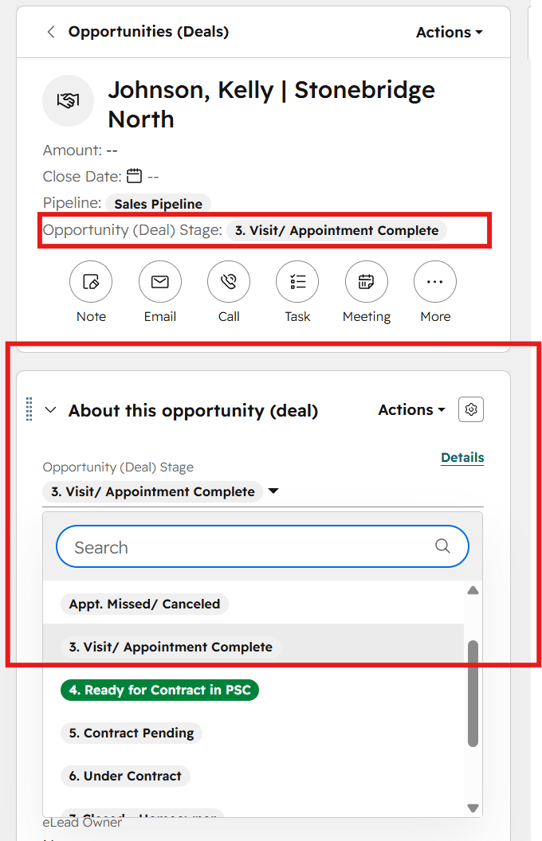
- Locate the Deal Stage field on the left side of the record.
- Click the current Deal Stage dropdown.
- Select the appropriate stage based on the current status of the buyer.
- HubSpot will automatically save the change.
📢 Important
Deal Stages should be updated as soon as the status of the Opportunity changes.
Keeping Deal Stages current ensures:
- Accurate sales pipeline reporting
- Proper automations and notifications
- Better visibility into buyer status
- Cleaner handoff into contract processing
Deal Stages:
1. Registered (No Appt. Yet)
A lead has been identified as a potential sales opportunity, but no appointment has been scheduled yet.
Deals are automatically created in this stage when a Sales Manager or Sales Counselor creates a new Opportunity.
2. Model Visit/Appointment Scheduled
A model visit or appointment has been scheduled, or the buyer has already visited the model.
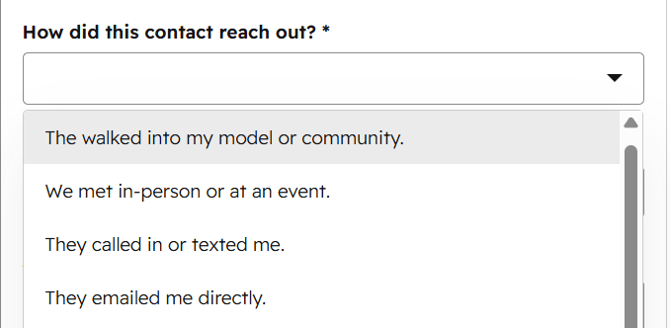
Deals are automatically created in this stage when a Sales Manager or Sales Counselor selects “They walked into my model or community” from the How did the contact reach out? dropdown during Opportunity creation.
Appt. Missed/Canceled
A scheduled appointment or model visit was missed or canceled.
3. Visit/Appointment Complete
📢 Important
Opportunities should not remain in Visit/Appointment Complete for extended periods without follow-up.
After the appointment is completed, the Community Manager should actively work the opportunity toward one of the following outcomes:
- Ready for Contract in PSC
- Long-Term Nurture
- No Deal/Lost
Keeping Deal Stages updated helps maintain accurate pipeline reporting and visibility into the current status of each buyer.
4. Ready for Contract in PSC
The buyer is ready for contract processing based on the Community Manager’s assessment.
This is the stage when the Community Manager should create the contact in PSClient.
When the deal reaches this stage:
- The Sales Manager will receive an automated email containing the buyer information needed for PSClient.
- The email subject will be: Data for PSClient Contract
📢 Important Email Address Rule
When creating the contact in PSClient, always use the same buyer email address listed on the HubSpot contact record.
If the email address in HubSpot is incorrect:
- Update the email address in HubSpot first
- Then create the contact in PSClient
Using different email addresses in HubSpot and PSClient will prevent records from syncing and matching correctly, which can cause errors in contract processing.
5. Contract Pending
The system automatically moves the deal into this stage once the contract process has started.
6. Under Contract
The system automatically moves the deal into this stage when the buyer is officially under contract.
7. Closed - Homeowner
The system automatically moves the deal into this stage when the sale has successfully closed and the buyer has become a homeowner.
No Deal/Lost
The opportunity is no longer active.
When moving a deal into this stage:
- Select a No Deal/Lost Reason
- Add a No Deal/Lost Reason Note when additional context is needed
Do not create a contact in PSClient for lost opportunities.
Long-Term Nurture
The buyer is not currently ready to move forward but may become an active opportunity in the future.
This stage should be used for buyers who:
- May have future interest
- Are delaying their timeline
- Need long-term follow-up
- Are not ready for contract processing
Opportunities in this stage should continue to receive periodic follow-up from the Community Manager.
Why Keeping Deal Stages Updated Matters
Accurate Deal Stages help:
- Maintain reliable pipeline reporting
- Improve sales visibility
- Ensure proper contract processing
- Support automations and notifications
- Help teams understand the current status of each buyer
Deal Stages should always reflect the current status of the Opportunity.